Inside a Whistleblowing Platform: 7 Components and the Data Flow
- 12 minutes readA whistleblowing platform is built from seven cooperating components: an intake layer that accepts reports over web, Tor, hotline, voice, and mobile channels; a triage and routing engine that classifies and assigns each case; a case management subsystem that owns the investigation lifecycle; an investigator workspace where authorised staff decrypt evidence and write findings; a two-way messaging channel that lets the platform talk back to anonymous reporters via a 16-digit receipt; an audit trail and reporting subsystem that records every action; and an admin and configuration plane that controls retention, encryption, and access policies. The reference architecture used here is grounded in publicly available application-security documentation from mature open-source whistleblowing software (verified April 2026) and the four lifecycle stages defined in ISO 37002:2021. The data flow is intake into encrypted submission storage, then routing to a recipient or audit committee, then case work over the receipt channel, then closure with a structured outcome and an audit trail that survives the reporting record after retention deletion.
Key Takeaways
- Seven components: intake, triage and routing, case management, investigator workspace, reporter messaging, audit trail, admin and configuration.
- Intake must accept written and oral reports, plus an in-person meeting on request (Article 9).
- Routing is most often misconfigured: SOX 806 accounting reports must reach the audit committee.
- Reporter messaging binds to the 16-digit receipt instead of an account, which keeps the reporter anonymous during dialogue.
- The audit trail outlives the case after retention deletion; the submission body does not.
What is whistleblowing software?
Whistleblowing software is a system that lets workers, contractors, suppliers, and other stakeholders report misconduct confidentially or anonymously, and that lets the recipients triage, investigate, and close those reports under a documented process. It is a category of governance, risk, and compliance (GRC) tooling, but with two unusual constraints: the reporter is often anonymous, and the law dictates much of the workflow.
The legal anchor is the EU Whistleblowing Directive 2019/1937, transposed nationally across the EU. As of April 2026, it forces every private legal entity with 50 or more employees, and most public entities, to operate an internal reporting channel with two hard timers: a 7-day acknowledgement of receipt and a 3-month feedback deadline (extendable to 6 months in justified cases). The standards anchor is ISO 37002:2021, a guideline (not a certifiable standard) published in July 2021 that frames the whistleblowing management system around four lifecycle stages: receive, assess, address, conclude. Those four stages are exactly the workflow states the case-management component has to implement.
A common confusion is to equate the platform with a “hotline”. A hotline is one intake channel. The platform is the full system that owns intake across many channels, the investigation, and the audit trail. The reference architecture in this post draws on open-source whistleblowing software used worldwide for anti-corruption activism, corporate compliance, human rights reporting, and investigative journalism, where the publicly available security documentation gives the most detailed description of how the boxes fit together.
The seven components, in order of data flow
The seven boxes are best read left to right along the data flow. Each one has its own security boundary and trust assumption, and a regulator who cares most about it.
Component 1: Intake
The intake layer is the only externally exposed surface and so carries every input-validation, rate-limit, and DoS-resilience control. A serious platform exposes several sub-channels behind one logical box:
- A web portal over HTTPS, typically the default channel.
- A Tor onion service v3, for reporters who need network-level anonymity.
- A telephone hotline, which writes a structured submission on the reporter’s behalf.
- Voice recording with optional AI transcription, where local law permits it.
- A mobile app, often a thin wrapper around the web portal.
- An in-person meeting scheduler, which the EU directive mandates as an option on request.
Intake is also where DoS resiliency lives. A serious platform applies a proof-of-work (for example hashcash, Argon2id with 1 iteration and 1 MB of RAM) on each unauthenticated request, plus rate limiting that caps user sessions at around 5 requests per second. These controls belong to intake because they protect availability of the front door.
Component 2: Triage and routing
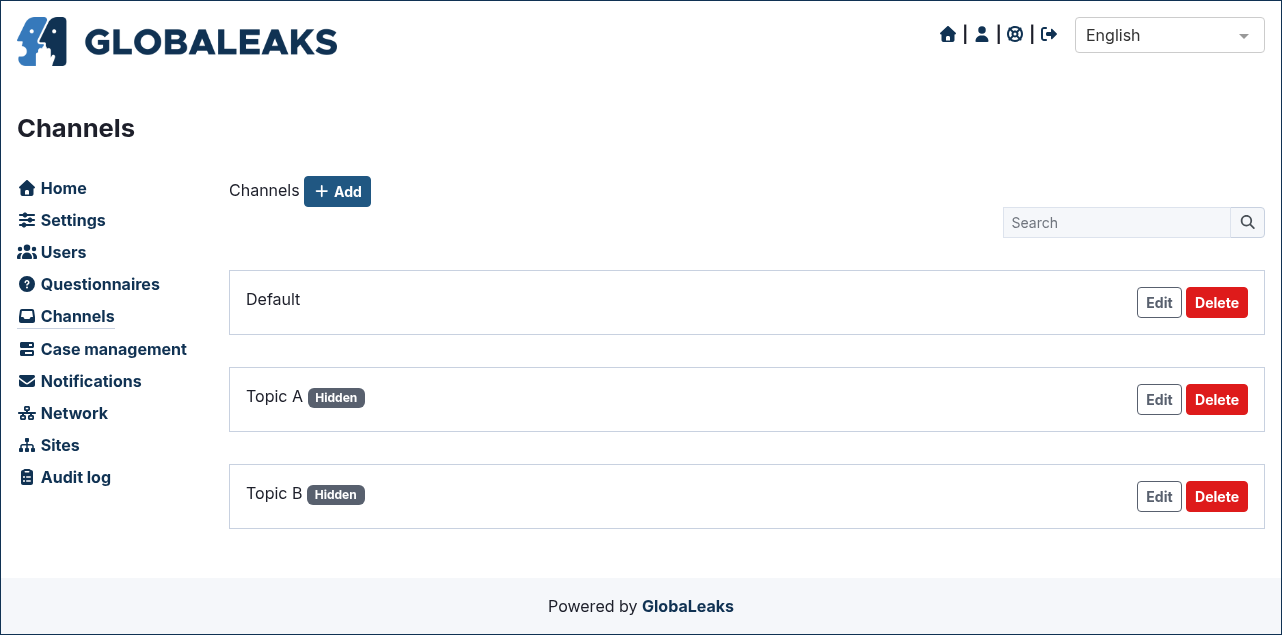
Once a submission arrives, the triage and routing engine classifies it and decides who is allowed to see it. Classification rules typically segment cases by topic (accounting, audit, harassment, fraud, safety, data protection) and by jurisdiction (which subsidiary, which national transposition). Routing then maps that classification to a recipient or a committee.
Routing is the component most often misconfigured. Under SOX Section 806, publicly traded companies in the US must let employees report accounting irregularities to a confidential channel that their audit committee oversees. If the routing rules send those reports only to line management, the audit committee never sees them and the company is out of compliance even though every other control is fine. The EU directive permits private entities of 50 to 249 workers to share resources for handling reports, but each subsidiary remains accountable for its own follow-up, which means the routing layer must keep cases visible per subsidiary even when the back-end is shared. Cross-border deployments that have to satisfy SOX, Dodd-Frank, and the EU directive at once are covered separately in the three-regimes comparison post.
Component 3: Case management
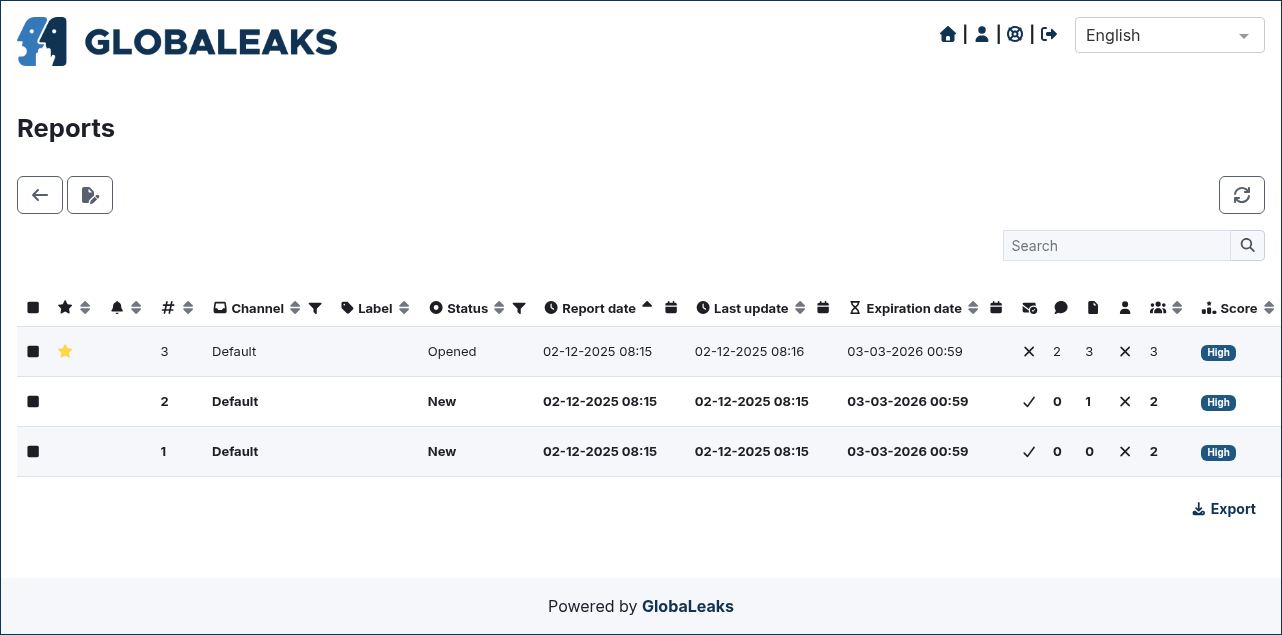
Case management is the core workflow engine. The four ISO 37002 stages, receive, assess, address, and conclude, become workflow states, each with a configurable SLA. Two of those SLAs are non-negotiable in the EU:
| Stage | SLA trigger | Source |
|---|---|---|
| Receive | Acknowledge within 7 days | EU Directive 2019/1937, Art. 9.1(b) |
| Assess/Address | Feedback within 3 months (max 6) | EU Directive 2019/1937, Art. 9.1(f) |
| Conclude | Documented outcome and retention tag | ISO 37002:2021, clause on conclusion |
The case object owns the metadata: classification labels, recipient assignments, status, opened-at, acknowledged-at, closed-at, retention-due-at. It does not own the body of the submission, which lives encrypted in the next box.
Component 4: Investigator workspace
The investigator workspace is where the recipient does the investigative work. The recipient logs in (with username, password, and TOTP-based 2FA per RFC 6238 on a serious platform), decrypts the submission with their per-user key, opens the case, requests evidence, records interviews, and drafts findings.
Access is segregated per recipient, and cross-case visibility has to be granted. A recipient assigned to subsidiary A’s harassment cases should not see subsidiary B’s accounting cases unless the routing rules explicitly grant it. The workspace is also the only place where plaintext exists on the server, and only inside an active recipient session. Outside that session, every artefact in the database is ciphertext.
Component 5: Reporter messaging
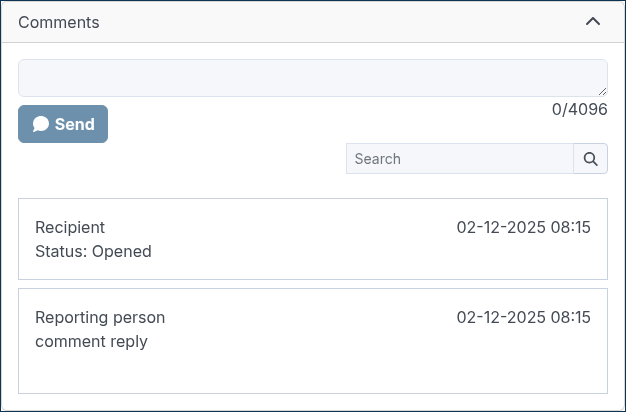
The platform has to be able to ask the reporter follow-up questions. If it does this by sending an email, it has just broken anonymity. The standard solution is to bind a two-way messaging channel to the receipt rather than to an account.
In the reference design, the receipt is a randomly generated 16-digit sequence that the backend issues at submission time. The format intentionally resembles a phone number, which makes it easy for a reporter to write down and conceal. The reporter holds it as a secret. To check on the case, send a follow-up message, or read the recipient’s questions, the reporter returns to the same intake URL (or onion address), enters the receipt, and lands inside the messaging channel. The platform never asks for an email address, and the database never links the receipt to an identity.
Component 6: Audit trail and reporting
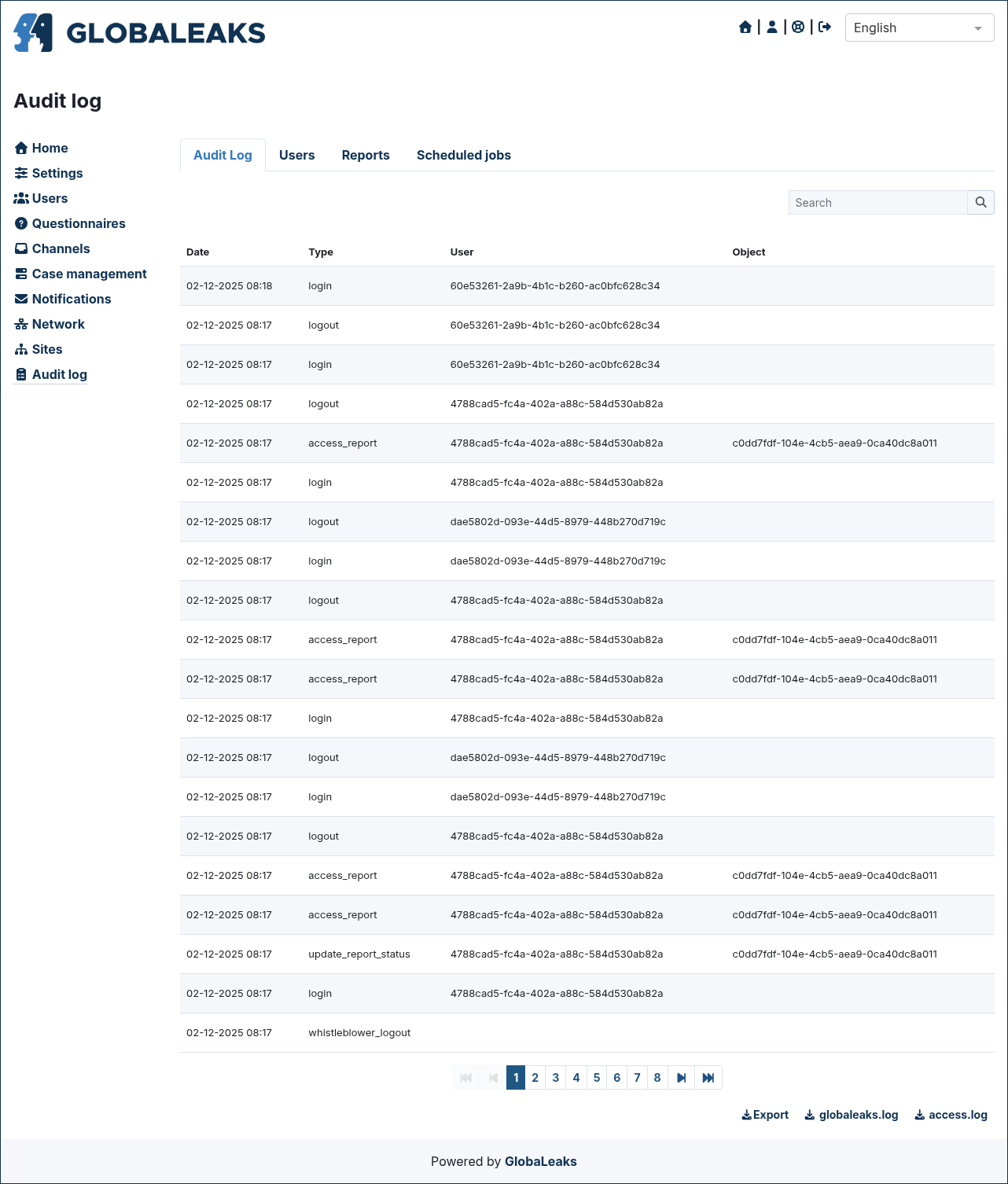
The audit trail is a structured action log of every operation that touches a case: intake, decryption, routing, status change, message send, attachment download, retention deletion. It is the component that outlives the case. When retention expires and the submission body and attachments are securely deleted (one common implementation does this via SQLite’s PRAGMA secure_delete = ON plus PRAGMA auto_vacuum = FULL), the audit-trail rows remain so the organisation can prove process to a regulator.
The reporting subsystem is the read-only sibling of the audit trail. It aggregates events into metrics: case volume by quarter, average time to acknowledgement, average time to closure, retaliation flag count, recipient backlog. These metrics are what the compliance officer presents to the audit committee, and they should never include the plaintext of any submission, only the metadata.
Component 7: Admin and configuration
The admin and configuration plane is where multi-jurisdiction deployments are tuned. It exposes per-tenant retention periods, encryption-key lifecycle, recipient permissions, intake-channel toggles, language packs, classification taxonomies, routing rules, and external integrations (SIEM, ticketing, HR systems for the no-retaliation watch). The admin plane has the authority to rotate keys but should not have the authority to decrypt past content. Key escrow, if enabled, is a deliberate trade-off and must be documented as such in the threat model.
How does the data flow through these components?
The seven boxes line up into one end-to-end story. A reporter opens the intake page, calls the hotline, or visits the Tor onion address; describes the concern; attaches evidence (typically with size and type limits enforced at the intake layer); and submits. The platform generates the 16-digit receipt, encrypts the submission body and attachments to each authorised recipient’s public key (typically via the PyNaCl bindings to libsodium, plus PGP for outbound notifications), and creates a case record with the metadata only.
The triage and routing engine then classifies the case and dispatches it to one or more recipients (or to the audit committee for SOX-flagged accounting cases). The recipient logs in, decrypts the submission with their per-user key, and begins the assess stage. Messages back to the reporter are encrypted by the recipient and delivered through the receipt-bound channel; the reporter reads them on a return visit, replies, and the loop continues.
Throughout, every action writes a row to the audit trail. When retention expires, the submission body and attachments are securely deleted but the audit-trail rows remain, with the case ID, the action types, the actors, and the timestamps preserved as evidence of a documented process. The reporting dashboard aggregates those rows into the metrics the compliance team needs.
Where the security boundary runs through each component
Most overviews of whistleblowing software list features and rarely draw the security boundary. Component by component, it runs like this:
- Intake terminates TLS (or Tor onion crypto) and is the only component that must accept untrusted input. It validates, rate-limits, and proofs-of-work before anything reaches the application core.
- The submission body and attachments are encrypted to recipients at submission time and are never plaintext on the server outside an active recipient session. The database row holds ciphertext.
- The triage and routing engine reads classification metadata and recipient identifiers, never the body.
- The audit trail is written by every component but should never include the plaintext of the submission or of any message. It records actions, not content.
- The reporter messaging channel decrypts only inside the recipient’s session; the database row holds only ciphertext.
- The admin plane has the authority to rotate keys but not to decrypt past content. Key escrow, if enabled, is a deliberate exception that belongs in the threat model rather than the default configuration.
This boundary is also why the audit trail is the only component that should outlive the case after retention deletion. The reporting record itself contains the personal data and the substantive evidence; once retention expires, GDPR and the EU directive both expect it to go. The audit trail contains the metadata of the process: who did what, when, in what order. Regulators want that proof of process even after the investigation record has been purged. Most vendors get this backwards by retaining whole submissions “for compliance” and end up with a GDPR liability instead of an audit defence.
Common implementation mistakes
Real deployments repeat five anti-patterns:
- Treating intake as a single web form instead of a layer with sub-channels (web, Tor, hotline, voice, in-person). The directive requires oral reporting and an in-person meeting on request; a web-only intake is non-compliant.
- Hardcoding routing rules to a single recipient list and discovering at audit that SOX Section 806 accounting cases never reached the audit committee.
- Logging plaintext submission text into the audit trail to “make investigations easier”. This silently turns the audit log into a copy of the submission and breaks the retention guarantee, because deleting the report no longer deletes the content.
- Linking reporter messaging to an email address so the reporter can be notified of replies, which silently breaks anonymity. The receipt-bound channel exists precisely to avoid this.
- Forgetting that retention deletion must operate per artefact (submission body, attachments, messages, audit rows) and not as a single timer on the case row. Without per-artefact retention, the platform either deletes too much (wiping the audit trail) or too little (keeping the body of a case that should be gone).
When NOT to Use This
The seven-box model is the wrong tool in five situations:
- You are evaluating a single specific vendor and need a feature-by-feature scorecard. This post is brand-agnostic and only describes a reference architecture.
- You need a deployment guide for a specific platform, with install commands and infrastructure setup. This post focuses on the conceptual component model, not on operations.
- You only need legal compliance language for an internal policy. The dedicated EU directive checklist post on this blog is a better starting point.
- You are looking for an opinion on which platform to buy. The architecture model here helps you compare platforms but recommends none.
- You only care about the encryption layer. The dedicated encryption design post covers that subsystem in much more depth.
FAQ
What is whistleblowing software?
It is a platform that lets workers, contractors, and other stakeholders report misconduct confidentially or anonymously, and that lets the organisation triage, investigate, and close those reports under a documented process. The EU Whistleblowing Directive 2019/1937 makes such a platform mandatory for private entities with 50 or more employees.
What components make up a whistleblowing platform?
Seven: intake (web, Tor, hotline, voice, mobile, in-person), triage and routing, case management, investigator workspace, reporter messaging, audit trail and reporting, and admin and configuration. They line up along the data flow from external report to closed case.
Does the EU Whistleblowing Directive require specific software?
No. The directive is technology-neutral. It mandates capabilities (confidentiality, anonymous-then-identified protection, a 7-day acknowledgement, a 3-month feedback deadline, an in-person meeting on request) but lets each organisation choose how to implement them.
What is ISO 37002 and is it certifiable?
ISO 37002:2021 is a guideline for whistleblowing management systems built around four stages: receive, assess, address, conclude. It was published in July 2021 and is currently under systematic review (stage 90.20 as of January 2026). It is guidance, not a certifiable standard.
How does the platform support anonymous reporting?
At submission time the backend issues a 16-digit receipt code that resembles a phone number. The receipt authenticates the reporter on return visits and binds the two-way messaging channel to their submission, with no email address or login required. The database never links the receipt to an identity.
Can one platform serve multiple jurisdictions?
Yes, if the admin and configuration plane exposes per-tenant settings for retention, anonymous-report acceptance, recipient routing, classification taxonomies, and language packs. The dedicated multi-jurisdiction mapping post on this blog covers the specific configuration switches for HinSchG, Sapin II, and PIDA in detail.